Oftentimes, gamers focus on the primary elements of a game, such as characters, story, gameplay, and the like. They rarely notice or appreciate the little but important details that actually make a game look and feel the way it is. That is why when you open your graphics menu and spot ambient occlusion, it can feel like a pop quiz you didn’t study for. You’re not alone, and yes, the term can sound intimidating at first.
Think of ambient occlusion as the quiet artist in the corner who adds the final brushstrokes. It darkens tight spaces and contact points so your scenes look grounded instead of like props sitting on a lit stage.
If the question “what is ambient occlusion?” ever crossed your mind, you would want to continue reading, as this guide will cover everything from meaning to the best settings and comparisons.
What is Ambient Occlusion and How it Works
First, let us look at the term’s etymology. The word “Ambient” refers to surrounding light, and “occlusion” means blocking.
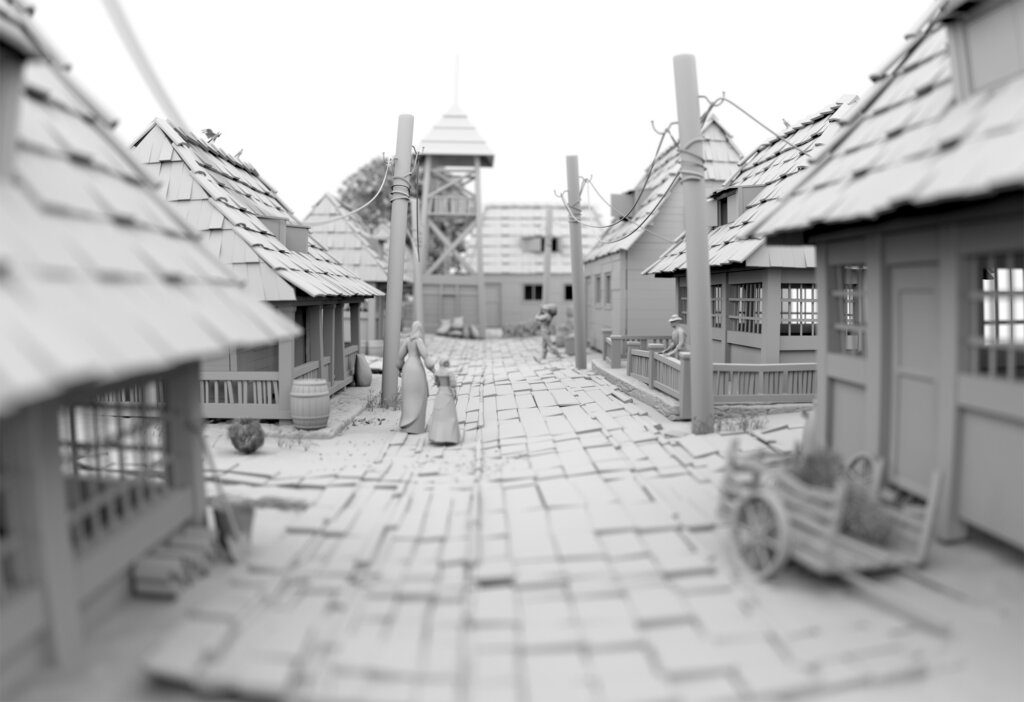
Now, let us answer what it is and what ambient occlusion does. In gaming graphics, ambient occlusion estimates how much of that surrounding light gets blocked by nearby geometry, then shading accordingly. It is a technique to simulate lifelike light behavior. In other words, this shadowing technique boosts the realism of 3D objects by mimicking naturally occurring soft shadows.
It is different from a classic shadow that comes from one lamp or the sun. Instead, it increases subtle shading in creases, corners, and where objects touch, so your brain reads depth and texture without thinking about it.
Key Takeaways
- Ambient occlusion adds subtle shadows where objects meet and increases.
- SSAO is the fastest, HBAO is stronger, and RTAO is best but demanding.
- A small performance cost often brings a boost in depth and realism.
How to Spot Ambient Occlusion in Games
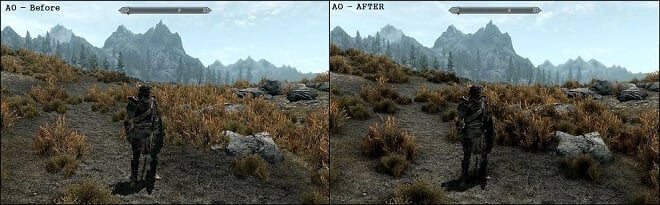
To visually see ambient occlusion in game projects, stand your character in a room where a wall meets the floor, or near a bookshelf. Toggle ambient occlusion on vs off and watch how objects either feel glued to the world or float slightly above it.
For instance, in GTA V, the moment ambient occlusion went on, alleys stopped looking like flat textures and started looking like places you should not hang out after midnight.t.
Types of Ambient Occlusion Techniques
SSAO: Screen Space Ambient Occlusion
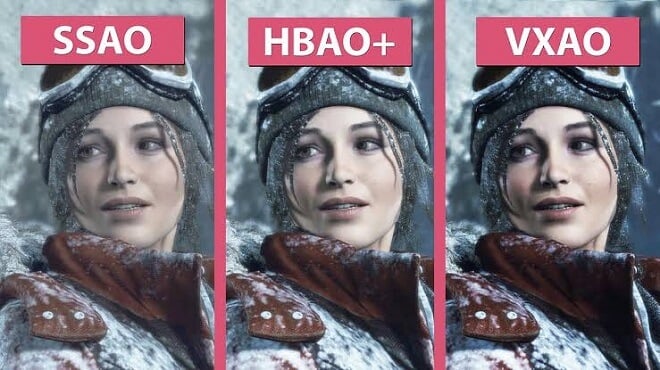
SSAO is the workhorse you’ll see in most games and engines. It samples the depth buffer of what’s visible on screen, which keeps it fast enough for real-time. The tradeoff is accuracy in tricky angles or thin geometry. Expect an improvement that’s often subtle and sometimes noisy, and expect it to scale well on mid-range hardware. On specific PC titles, SSAO eats roughly five to ten percent of your GPU frame time. That is a decent quality bump for a manageable cost if you set it to low or medium.
HBAO and HBAO+: Horizon-Based Ambient Occlusion
NVIDIA’s HBAO looks for horizons in the depth field to estimate how much ambient light gets blocked. HBAO+ refines the sampling so you get richer contact shadows at a better cost than older variants. If you have headroom on the GPU, HBAO+ is a nice upgrade over baseline SSAO. If your rig is already wheezing, SSAO is the safer bet.
ASSAO and CACAO: Modern, Scalable SSAO
Intel’s ASSAO aimed to scale from laptops to desktops under one codepath. AMD’s open CACAO builds on that, with multiple quality levels and smart sampling. Studios pick these because they’re open and predictable. That means fewer surprises when you flip the preset from medium to high.
VXAO: Voxel Ambient Occlusion
VXAO converts scene geometry into voxels to evaluate occlusion in 3D space. It captures more than what is currently on screen, so it looks stable and natural in cluttered scenes. It’s heavier than SSAO or HBAO and shows up in only a few titles like Rise of the Tomb Raider. When it appears, expect convincing contact shadows and a steeper performance bill.
RTAO: Ray Traced Ambient Occlusion
RTAO sends rays around points to see what geometry blocks the ambient light. The look is excellent, and it avoids some of the screen-space quirks completely. Cost is the catch. Engines like Unreal expose RTAO, often with temporal denoising to keep noise down, and you will feel it in GPU time.
Here is a more detailed side-by-side comparison:
| Technique | How it Works | Visual Quality | Best For |
|---|---|---|---|
| SSAO | Samples screen depth to shade visible geometry. | Good; subtle contact shadows. | Most games; mid-range PCs. |
| HBAO | Estimates occlusion via horizon angles. | Very good; stronger shadows. | Single-player visuals, higher-end GPUs. |
| HBAO+ | Refined version of HBAO with cleaner sampling. | Excellent for screen-space AO. | High-end PC quality settings. |
| ASSAO / CACAO | Adaptive SSAO variants with scalable quality. | Good to very good at higher presets. | Cross-platform, scalable projects. |
| VXAO | Voxelizes scene for 3D occlusion checks. | High; more global awareness. | Showpiece scenes on powerful rigs. |
| RTAO | Ray-traces occlusion against geometry. | Highest; realistic and stable. | High-end PCs, next-gen consoles. |
The Verdict: What is the Best Ambient Occlusion?
- SSAO vs HBAO: SSAO is fast, but HBAO is stronger.
- HBAO+ vs SSAO: HBAO+ is generally a better choice if the GPU is capable of handling it.
- SSAO or HBAO: The choice boils down to performance headroom and preferred visual quality.
Ambient Occlusion in Games
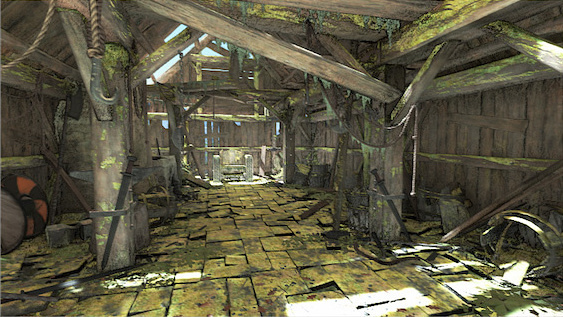
Indoor vs outdoor scenes
- Indoor: ambient occlusion stops surfaces from looking like they glow where they meet.
- Outdoor: It gives foliage and rock faces the bite your eyes expect in the real world.
Engines and tools
- Unity’s documentation spells out that it darkens creases and intersections and is implemented as a renderer feature in URP.
- Unreal recommends using it as a subtle addition that complements your lighting rather than a heavy-handed filter.
Performance vs Visual Quality
- SSAO usually takes a small slice of the frame budget that scales with resolution and quality. Intel’s guidance pegs it around five to ten percent of GPU frame time in many engines.
- HBAO+ is generally costlier but more robust in messy scenes.
- VXAO and RTAO look great but sit in the premium tier for performance, so plan for them as you would plan for high-end shadows.
Practical Tips for Ambient Occlusion Settings

- Do a simple two-minute test by toggling screen space ambient occlusion on or off to train your eyes.
- Keep intensity modest and radius conservative to avoid dark outlines around character silhouettes and to maintain visible effects.
- Use SSAO for mid-range rigs, HBAO+ or RTOA for high-end setups.
- Record the FPS for each preset so you have a baseline for future levels.
- Document that choice in your graphics checklist so new team members stay aligned.
Frequently Asked Questions
Q: Whats ambient occlusion?
A: Ambient occlusion estimates how much surrounding light is blocked by nearby geometry and darkens those areas. Your eye reads that as depth and contact, which makes the world feel solid.
Q: Does ambient occlusion affect performance?
A: Yes, it often causes lower frames per second (FPS), adding depth and realism for better visual quality.
Q: Should I turn AO on or off?
A: If you have the headroom, keep ambient occlusion on because the visual payoff is real. If performance dips, lower the quality or turn it off for competitive play, where clarity and frames trump subtle shading.
Q: What is the difference between SSAO and HBAO?
A: SSAO samples in screen space are fast, but can be noisy or miss thin occluders. HBAO looks for horizon lines in depth to produce stronger contact shadows with a higher GPU cost.
Q: What is HBAO+?
A: It is a more optimized variant of horizon-based ambient occlusion. It is cleaner and has a refined visual quality.
Q: Does ray-traced AO replace SSAO?
A: It can work for high-end targets because it avoids many screen-space artifacts. You will still need filtering and smart sampling to keep noise low, and the cost is higher than SSAO.
Q: Which ambient occlusion is best?
A: Not one type is the be-all and end-all. The answer always depends on your hardware and preferences. In particular, SSAO is for speed, HBAO+ is for quality, and RTAO is for realism.
Final Thoughts
Ambient occlusion is one of the best “value-for-time” graphics settings. Even subtle uses in scenes enhance depth and realism without full global illumination, emphasizing how powerful a tool it is in 3D rendering. For gamers and game developers, learning the ins and outs of ambient occlusion is essential for creating believable, grounded, and lifelike visuals.

